Stitch HQ
I created a mobile app designed and built to be the one place a sewist has everything they need, from uploading a pattern and getting AI-powered guidance, to tracking their fabric stash and sharing finished work with a community that understands the craft.
Full walkthrough of the working app, running on my phone
My Role
Solo — Designer, Researcher, and Developer
The Problem
Sewists have everything scattered and no single place to manage all their tasks.
Sewing is an inherently complex craft. A single garment project requires choosing a pattern, understanding fabric requirements, buying the right yardage, pre-treating fabric correctly, interpreting dense technical instructions, and tracking what materials you have left over. Most sewists manage this across multiple apps, websites, notebooks, and memory.
As a sewist myself, I experienced this fragmentation firsthand. When I looked at the existing app landscape, I found tools that addressed pieces of the problem in isolation, but nothing that brought the full journey together, and nothing that used AI to genuinely reduce the cognitive load of the craft.
Platform
iOS (React Native)
Tools
Google Stitch, Claude, Claude Design, Claude Code, Xcode
Project Timeline
Days to first user test
~4 months to a working iOS app
Outcomes
Features
Six AI features run on live APIs with a deployed backend.
Deployment
Built and deployed as a standalone native iOS app through Xcode.
Research
Two rounds of research with sewists. Four design decisions from the first, two fixes from the second.
The Process
From concept to a tested app
My process here was deliberately fast-to-testable, and AI tooling is what made that possible. Instead of spending weeks on research before touching a design, I got a prototype in front of real users quickly, and then let the research and the competitive analysis drive the next version.
Rapid Prototyping
One prompt, four AI tools, in parallel
I ran one detailed product brief through four AI design tools at the same time — Claude, Figma Make, Google Stitch, and Cursor — partly to find the strongest starting point fast, partly to understand the tooling landscape properly.
One prompt, four tools
The brief specified the whole product in one pass: upload a pattern by document or photo, get fabric recommendations with pre-wash and shrinkage guidance and the yardage to buy, links to where you can buy it, an easier-to-read version of the pattern instructions enriched with tips, and a fabric tab that tracks what you own and prompts you to update it after each project.
Google Stitch as the strongest starting point
Its first generation was closest to the visual direction I wanted, and it lays every screen out on one artboard — so I could see the whole flow, rearrange it, and add screens without re-prompting. The output had rough edges, but the hierarchy and flow were good enough to build on rather than just refer to.
Reviewing all four side by side surfaced two features none of them had proposed and the product clearly needed: a measurements profile to drive size recommendations, and a persistent AI chat through the walkthrough. I added both, then took it to a local sewing store.
User Research
Four findings from a local sewing store
I went in wanting to pressure-test my assumptions rather than confirm them. That mattered — two of the four findings were things I hadn't anticipated at all, despite being a sewist myself.
“Current social media is not great for this.”
Instagram hashtag search is unreliable for finding how other people made a specific pattern.
Response: a community gallery built around patterns, with AI-generated tags to make finished work discoverable.
“I tried a fabric catalog app and stopped using it.”
Cataloging fabric feels laborious when it's mandatory.
Response: make the stash entirely optional — useful for those who want it, never a barrier for those who don't.
“I'd love to photograph my fabric to add it.”
Manual data entry is the primary friction point for stash tracking.
Response: photo-based fabric intake, with AI auto-identification of material and composition.
“I love the idea of instructions being given in a more intuitive way.”
Standard sewing pattern instructions are dense and technical.
Response: an AI-generated walkthrough with enriched steps, Tailor's Secret tips, and visual guides.
Competitive Analysis
Hands-on analysis of the two most relevant competitors
I conducted hands-on analysis of the two most relevant competitors, documenting specific UX successes and failures through first-person use.
| App | Pattern upload | AI walkthrough | Fabric stash | Size recommendation | Community |
|---|---|---|---|---|---|
| Sewpal | Internal library only | Broken AI entry point | None | None | None |
| Stash Hub | Manual entry only | Catalog only | Yes, but overwhelming | None | None |
| Stitch HQ | Digital file or photo scan | AI-enriched | Optional, photo-first | AI recommendation from body measurements | Community makes and discussion |
Sewpal's "Need help with my current project" button opened the camera instead of a chat window. To ask a text question, I had to press the "Looking for new ideas" button as a workaround. That single interaction failure informed one of Stitch HQ's core design principles: AI should always be immediately, unambiguously accessible.
Stash Hub confirmed there's real demand for cataloging fabric — and why people quit. Its entry form front-loads an overwhelming number of required fields before you see any value at all, which is the same friction a user described to me at the sewing store.
Iteration
What the generated output couldn't decide for me
The AI tools got me a structurally sound first pass, fast. They don't have taste, and they don't know what a feature costs to keep working. Both turned out to be where the design work actually lived.
Visual Polish
Uniform icon backgrounds
The generated set was inconsistent from screen to screen, which made the whole interface feel noisy before you'd read a word of it.
A fabric icon I drew myself
Nothing in the icon library actually read as fabric. For an app built around material, that isn't a detail worth compromising on.
Cut the New Measurement quick action
Measurements barely change. It was occupying prime real estate that belonged to the things people do every week.
Redrew the AI chat icon
The original didn't read as a chat bubble. This app's whole premise depends on that entry point being unmistakable.
Negotiating constraints with an AI dev partner
Sourcing the Look recommends fabrics for a pattern and points you somewhere to buy them. How it should actually work took a back-and-forth to settle.
- Claude's proposal
- A hand-curated list. Pick fabrics for each pattern individually.
- What I asked
- Why does this need curation instead of a live lookup?
- The reason
- The feature needed a link to one exact product. But patterns can sit in a user's library for months before they're sewn — long past when that link still resolves. And even with no time elapsed at all, matching one exact listing is a harder, less reliable task than matching a fabric type.
- What I knew that it didn't
- Curation only works on a closed set, and this product is an open one. You can't pre-pick fabrics for a pattern nobody has uploaded yet, and accepting any pattern a sewist already owns is the entire premise of the app. The proposal solved the link problem by quietly breaking the product.
- What shipped
- Reuse the fabric-type data the pattern inference already extracts, and link to a filtered category page on a real retailer rather than to a single listing.
The exchange taught me something specific about where the model is weak. It can reliably tell you what kind of fabric a pattern calls for. It cannot reliably hand you a product URL that still resolves next month — listings move, stock sells out, and nothing in the model knows when that happens.
So the fix wasn't to abandon the live lookup. I kept the mechanism and changed the target. A category page for cotton twill doesn't expire the way one listing does.
Smaller calls from the same conversation
- Dropped the sponsored badge and the per-unit price, because neither is honest on a category link.
- Renamed “Purchase” to “Shop This Fabric,” since it no longer goes to checkout.
- Dropped one retailer that proved unreliable.
Build
From prototype to a running app
A convincing prototype isn't a product. Getting to something with working features meant four tools, each right for a different part of the work.
Google Stitch
Fast, and close to the direction I wanted. Every screen on one artboard made the flow easy to iterate — but each small refinement meant another prompt, which got slow.
Claude Design
I wrote a design specification, then moved the prototype across. It reproduced the screens exactly as intended and let me adjust the UI directly instead of prompting for every change.
Claude Code
Built the design into a running React Native app. At first that was only my prototype screens translated onto my phone — no logic, nothing being generated.
Claude
The layer between me and the build. I'd screenshot what Claude Code was doing and work out with Claude what was actually happening, talk through constraints before committing to them, and turn half-formed ideas into prompts precise enough to act on.
“Turn this into a working app” was far too vague a prompt to act on. Getting to real functionality meant specifying exact behavior feature by feature, and testing each one on my phone before moving to the next. The design work didn't stop when the screens were done — it moved into defining what every feature was supposed to do.
Six AI features, live
Every AI feature runs on a real API with a deployed backend. None of it is mocked.
Multi-modal pattern reading
Digital files and photos of paper patterns, with an OCR-to-vision fallback.
Native iOS build
Deployed standalone through Xcode. It runs as a native build on my own device rather than a public release.
Where it stands now
Six experiences, one arc
The app follows the shape of a sewing project — setup and discovery, active making, then completion and sharing. Each section works on its own, so the app is useful at every stage rather than only to someone who uses all of it.
01
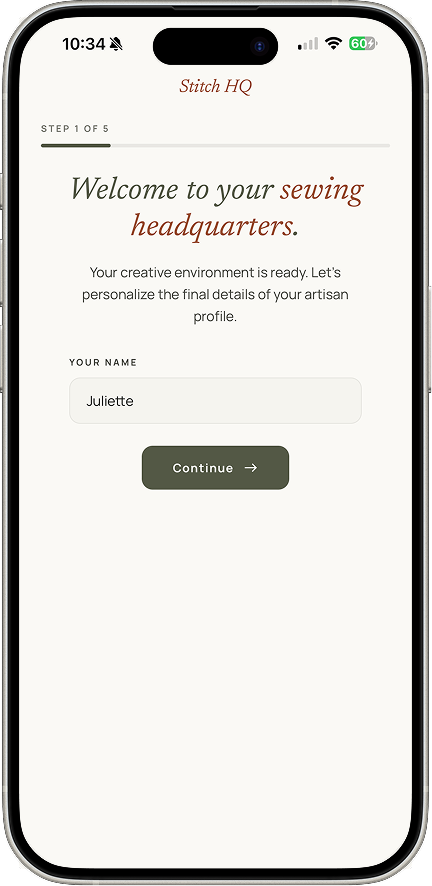
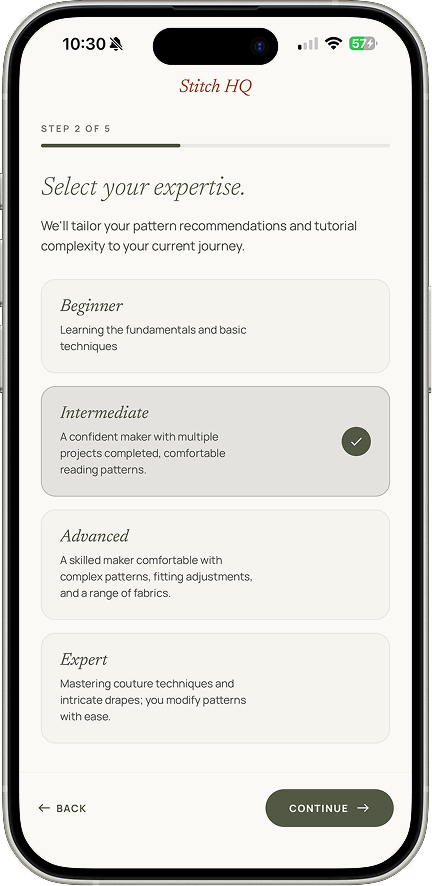
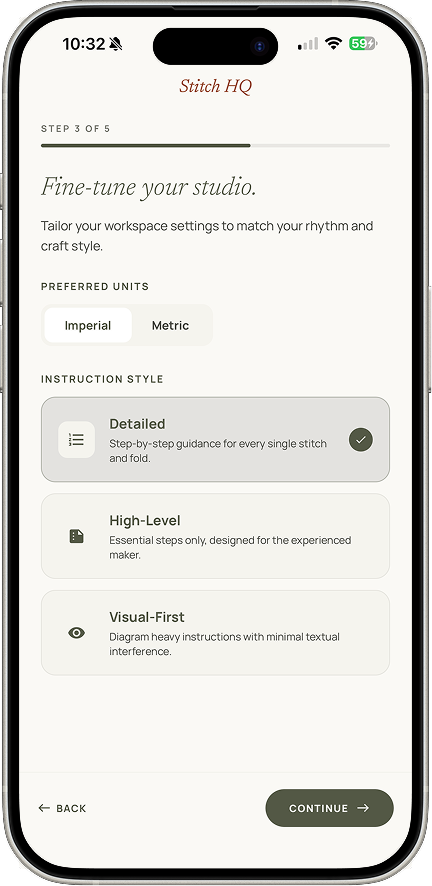
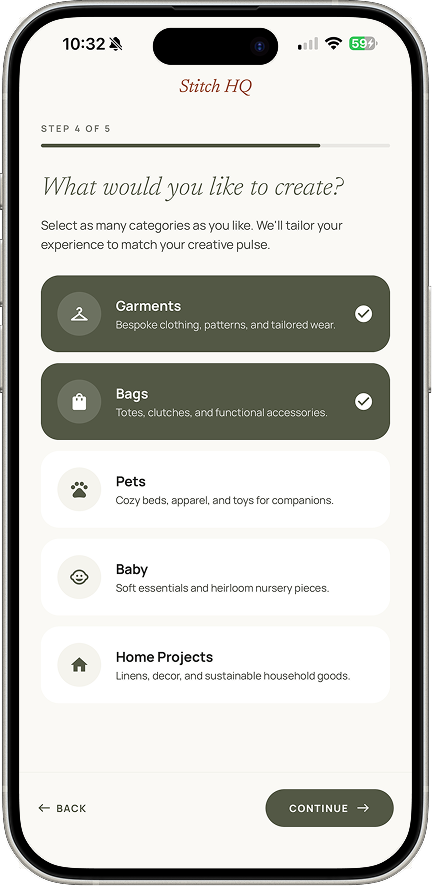
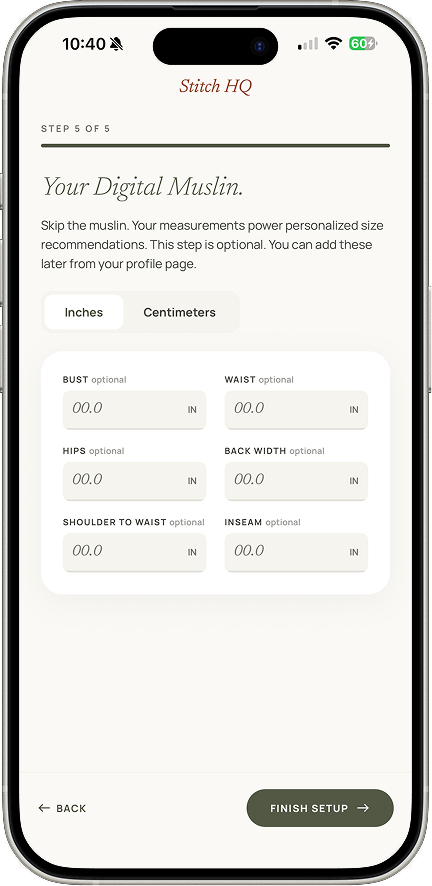
Onboarding that earns personalization
Five low-friction steps. Instruction style shapes how the walkthrough presents steps later, and measurements drive a size recommendation on every pattern you open.
02
A home built around resuming
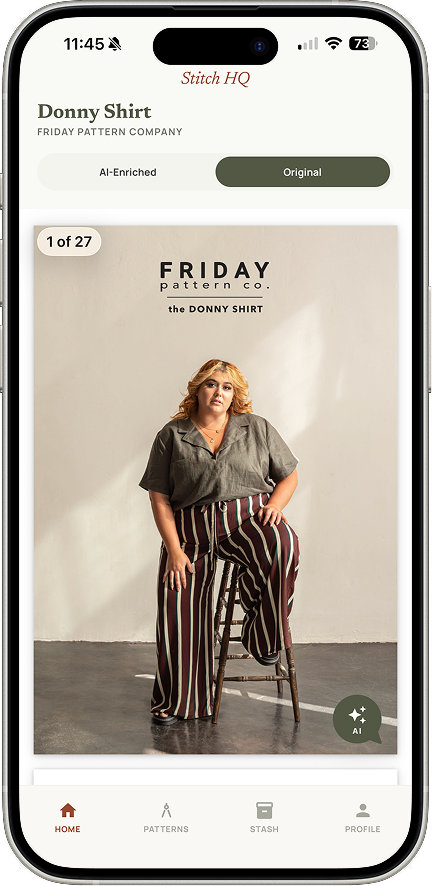
The in-progress project surfaces completion, fabric, and a direct continue action. Below it sits the Inspiration Board — real patterns from real brands, sponsored placements clearly labeled, which is what keeps the app free.
03
Patterns that know who you are
Upload a digital file or photograph a paper pattern. You get a size recommendation from your own measurements, plus what other sewists have said about how that pattern actually fits.
04
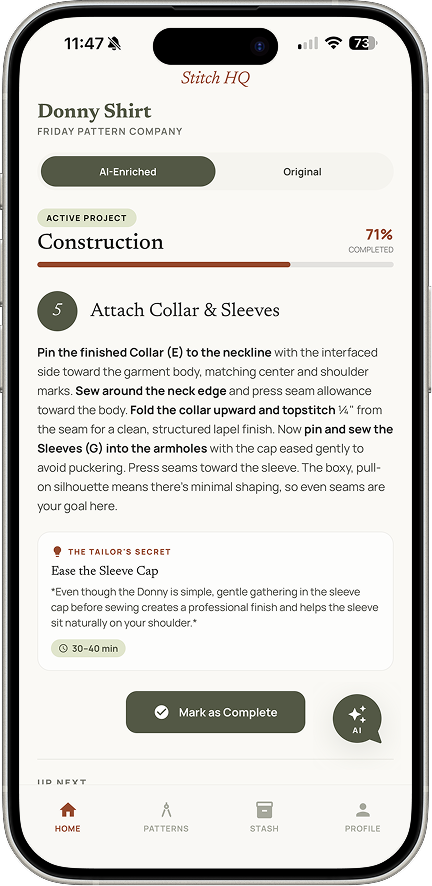
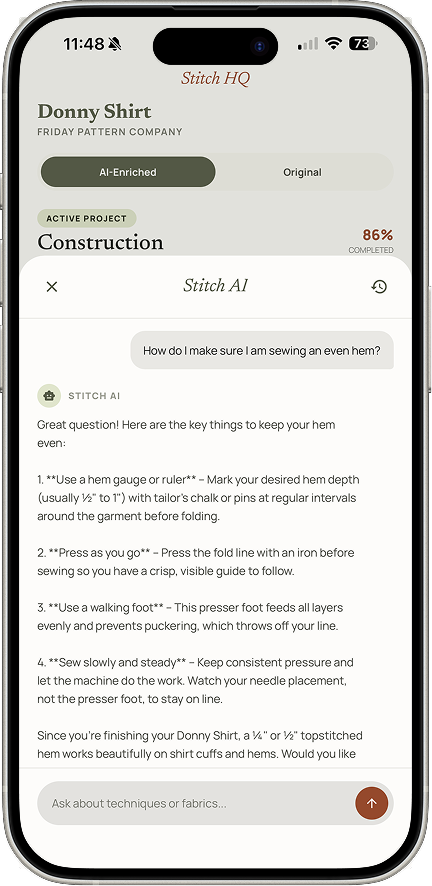
A guide with help one tap away
The walkthrough generates from whatever pattern you upload, not a proprietary library. Each step has enriched instructions, a visual guide, a time estimate, and a Tailor's Secret. Stitch AI is reachable from any step — the direct fix for the Sewpal failure.
05
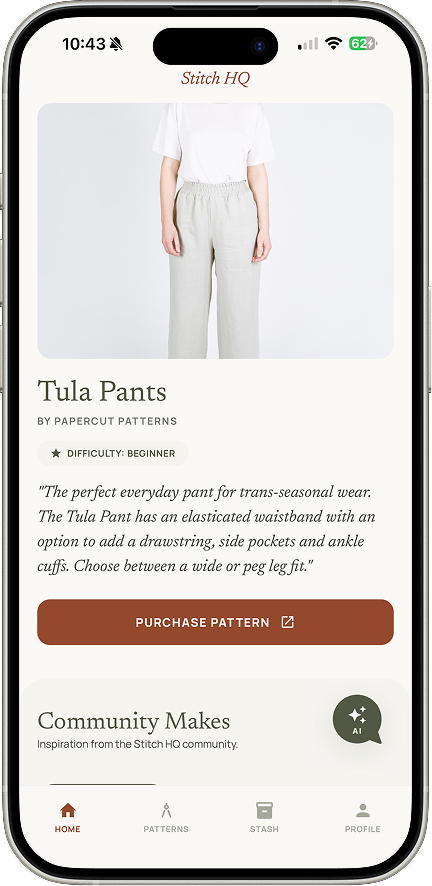
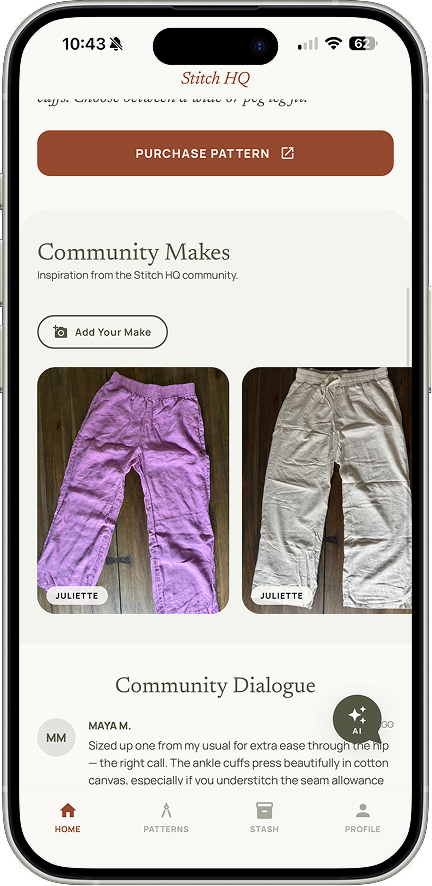
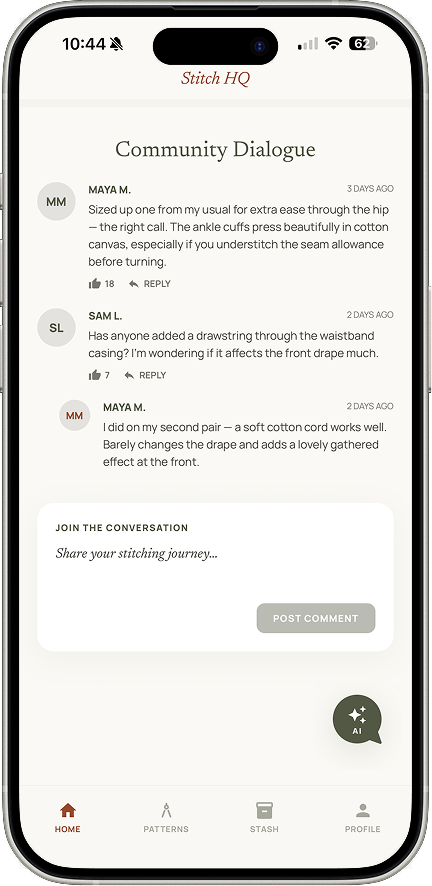
Community organized around the pattern
Community Makes shows other people's versions of that exact garment, with fabric notes. A dialogue thread holds questions and tips where they're needed, rather than buried in a personal feed.
06
A stash that respects your time
Five fields, AI identification from a photo, and entirely optional — for reasons the research made clear. Everything else in the app works without it.
Usability Testing
I took the working app back to the store
Once the app was running on my phone with its AI features live, I went back to the same sewing store to find out whether the decisions I'd made from the first round of research had held up. I picked four tasks, handed over the phone, and didn't narrate.
Success metric — task completion, three sewists
“Everything I need to know is easy to find — you can tell a sewist made this.”
Found it, didn't understand it
Everyone found Add Fabric, but only one person used the photo scan. Photo-first entry was my answer to the biggest finding from round one — people abandon stash apps because logging fabric by hand is a chore. If most users type it in anyway, the fix isn't doing its job. The button was findable; it just didn't say what it does.
Change: helper text now states that the scan detects the fabric and fills the form for you.Right place, wrong order
The person who missed Sourcing the Look wasn't lost. She went to Materials & Notions first, then the AI chat — the always-available fallback working exactly as designed. She told me the other way to find fabric wasn't obvious. The section was simply too far down the page.
Change: moved it up, directly beneath Materials & Notions, where she was already looking.Also asked for
Editable interests after onboarding, and related patterns surfaced when you open one — both Pinterest behaviors, and both queued for the next round. Three users is a small sample, but it was enough to find two problems I couldn't have found by reviewing my own design.
Reflection
What this project taught me
When your own instincts become a design risk
As a sewist, I would absolutely use a stash tracker, so I nearly built it as a central feature. Then a user told me she'd abandoned one because logging fabric is a chore. It shipped optional. Being a user yourself doesn't mean you speak for all users.
AI widened what I could own
I went from an idea to a prototype in real sewists' hands within days, and then to a standalone iOS app with working AI features and a backend behind it. AI didn't just speed up my workflow — it widened what I could own. I shipped things I'd previously have had to hand off.
Using AI thoughtfully as a product feature
Adding a chatbot is the easy answer. The harder question is where else in a product AI can do meaningful work, and answering it requires knowing both what AI is good at and where users are actually struggling. Every AI touchpoint here removes a friction I had documented — photo fabric identification exists because manual entry is why people quit.
Product thinking alongside UX thinking
A subscription is friction before the user has seen any value. Designing a sponsored placement model instead meant stepping back from screen design and asking how the product sustains itself. Pattern brands want visibility, sewists want to discover designers they trust — aligning those two interests, rather than extracting from the user, is what makes the model feel native rather than bolted on.